
Text messaging has quickly become the default form of communication on smartphones. Sure, you can call a friend to update them on your weekend plans, but it’s not as quick or efficient as a simple text message. And when combined with the ever-growing library of emojis available for iPhone and Android, it’s easier than ever for recipients to convey your tone and true meaning loud and clear.
Emojis have been around for decades and have become even more popular in 2024. Most smartphones come with their own catalog of default emojis, so you can quickly send a smiley face or thumbs up with just a few taps on the screen. Even better, new emojis are released regularly, giving you an interesting way to chat with friends.
Companies like Apple tend to push these new emojis directly to devices, but that’s not the only way to get new emojis on your phone. From checking for software updates to installing companion apps, here’s how to get new emojis on your iPhone or Android device.
How to get new emojis on your iPhone
The easiest way to get new emojis is to wait for them to arrive via a software update on your iPhone. In most cases, software updates arrive without any action on your part, but if you want to initiate an update or check if it is available, here’s what you need to do:
Step 1: your setting app.
Step 2: choose General > Software Update.

Step 3: Please wait while the system checks for updates.
Step 4: If available, select: Download and install To move updates.

How to get new emojis on your Android phone
If you have an Android phone, you can often get new updates through software updates.
Step 1: your setting app.

Step 2: choose System > System Update.

Step 3: If there is an update available, you can download and install it from here.
Step 4: Once installed, your phone will display any new emojis available.
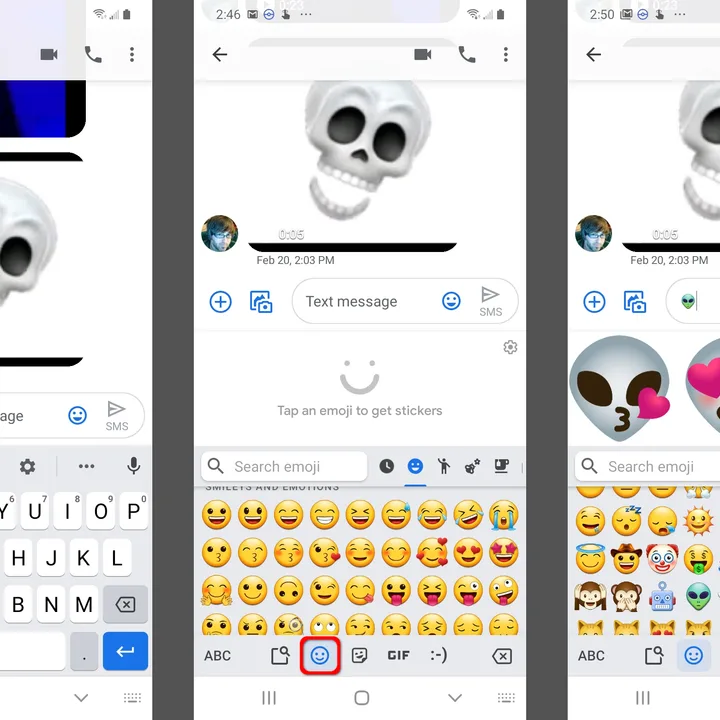
Create new emojis with Emoji Kitchen
Software updates aren’t the only way to get new emojis. Google’s Gboard keyboard does something interesting with emojis. No new emoticons will be added. Instead, remix an existing item. Have you ever wanted a ghost emoji with dollar sign eyes? Or is it an alien spaceship with a love heart on top? Probably not, but admit it. Now you’re thinking about how to use it, right?
This all happens in Gboard and is only available for Android phones. If you have a Google Pixel smartphone, you may already have one, but you may need to turn it on. We’ll show you how to enable the feature and how it works. Download and activate Gboard before starting this process.
Step 1: Open your preferred messaging app and tap the text field to open the keyboard.
Step 2: select options Then press the button in the upper left corner setting.


Step 3: choose Emoticons, stickers, GIFs.

Step 4: make sure emoji stickers It’s on.

Step 5: Go back to your messaging app and select an emoji from: emoticon category.

Step 6: When displayed in a text box, Gboard will generate several remix emojis based on that initial emoji.

Step 7: Choose one and send it as a sticker.

Install third-party keyboards and apps
Emojis are now available on both iPhone and Android, so you don’t have to download a new keyboard to get them. But if you download some apps, you can get more emojis and other bonuses.
bitmoji (also available for Android) is perfect if you want to create personalized emojis. You can create your own version of Bitmoji by simply downloading it. This version can be posed in a variety of ways and adds a personal twist to the classic emoji.
Another option is Facemoji (Also available for Android) It has over 5,000 emojis, a built-in meme generator, and a fully customizable keyboard.
There are other options, but be aware that downloading a completely strange keyboard can be risky. Emojis rarely hurt anyone, but key trackers can, and your keyboard knows everything you type. So be careful when downloading a new keyboard for emojis. If in doubt, don’t download.