After rolling out its AI-powered Prompted Playlist feature to North American users earlier this year, Spotify is now introducing another smart tool to improve the way music flows from one track to the next.
With the latest update, the streaming giant has added a new feature called Smart Reorder for playlist switching. As the name suggests, this feature automatically reorders the songs in your playlist, making transitions between tracks smoother. It builds on the Mix tool introduced last year, allowing users to manually add volume, EQ, and effects curves to achieve seamless transitions between tracks in a playlist.
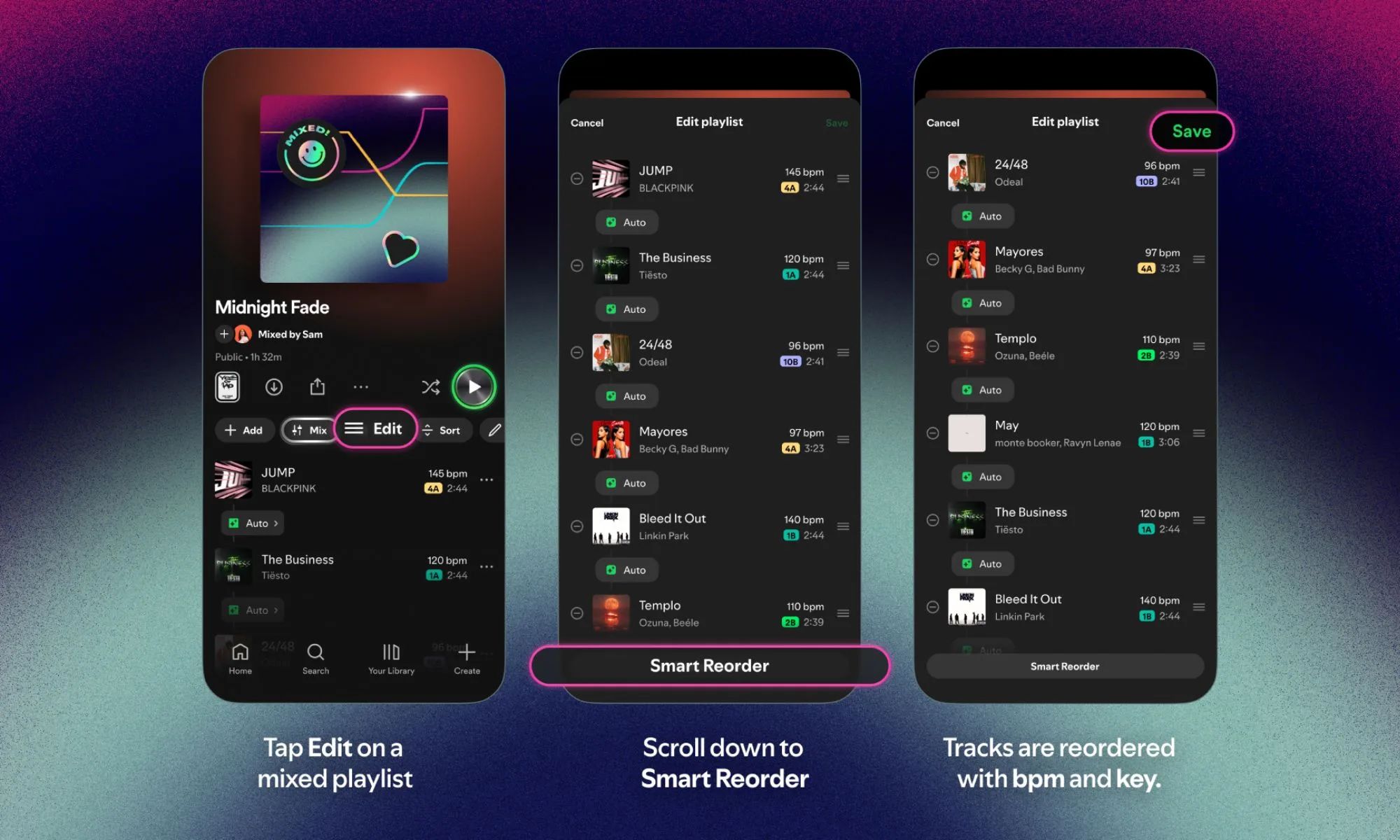
Instead of manually reordering or applying effects to avoid sudden changes in tempo or mood, you can now create playlists that feel like a carefully curated DJ set with a single tap. Smart Reorder appears as an optional control within the Mix function.
How to use Smart Reorder
You can access this feature by tapping the Edit button, scrolling down, and selecting the Smart Reorder option. When activated, it analyzes factors such as beats per minute (BPM) and key to reconstruct the song into a more cohesive listening sequence.
Like the Mix feature, Smart Reorder doesn’t permanently change your playlist. The original track order will remain intact and users can turn this feature on or off at any time. This flexibility gives you complete control over your carefully curated playlists while also giving you the option for a smoother, algorithm-driven listening experience when you want it.
Smart Reorder is launching globally for Spotify Premium subscribers, marking the latest addition to the platform’s growing suite of AI-powered features.